
The following CircuiTree updates are part of the October 28, 2026 release:
New & Improved
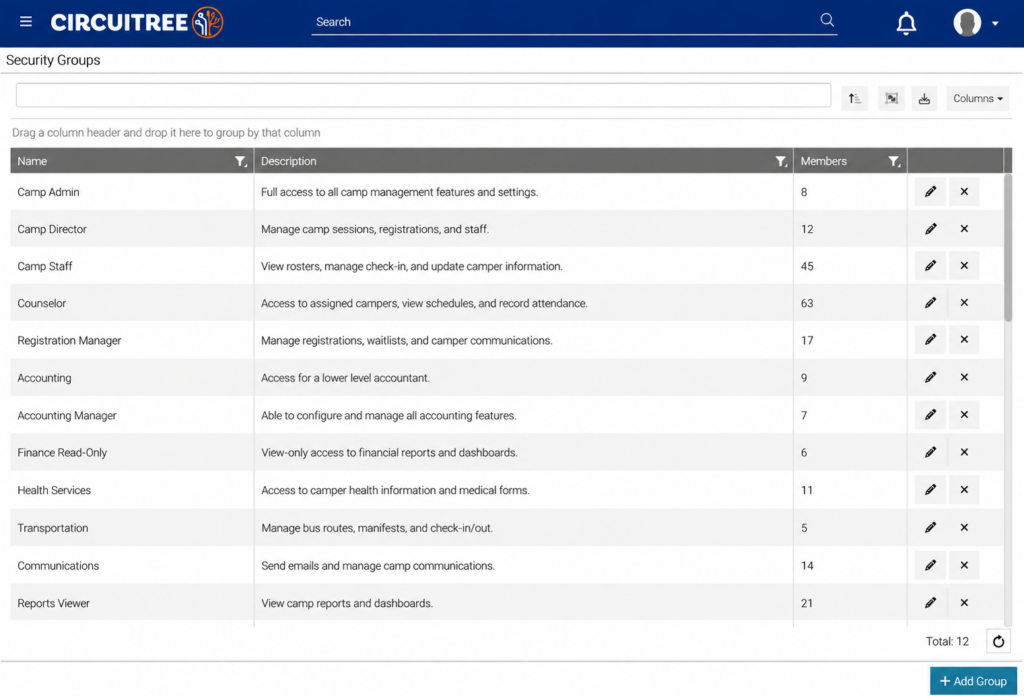
Security Groups – Admins can now manage security groups on the new Security Groups screen, found under Config > General > Security. The list shows each group’s name, description, and number of members, and you can search, sort, and filter it. Select Add Group to create a group, use the pencil icon to edit a group’s name and description, or use the X icon to delete a group after a confirmation step. Name and description are required.
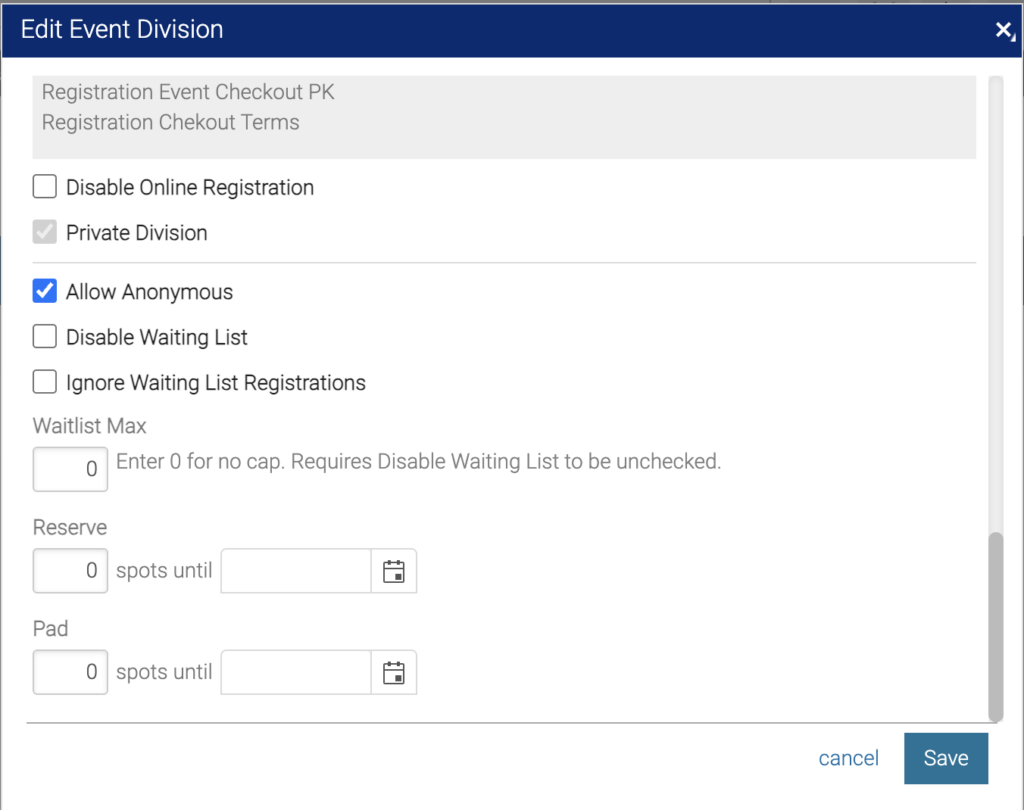
Waitlist Max – You can now set a limit on how many attendees or itineraries can join an event division’s waitlist. When you add or edit an event division, select more at the bottom of the form to find the Waitlist Max field, and enter 0 for no limit. Waitlist Max works only when Disable Waiting List is unchecked.
Easier Charge Corrections – Event charges can now be changed after registrations exist. On an event’s Charges tab, edit a charge and set its Amount to $0, then choose whether to reprice existing registrations. You can also remove a charge with the X icon, as long as no GL batch has been created for it. If a GL batch exists, the charge stays locked and a message explains why.
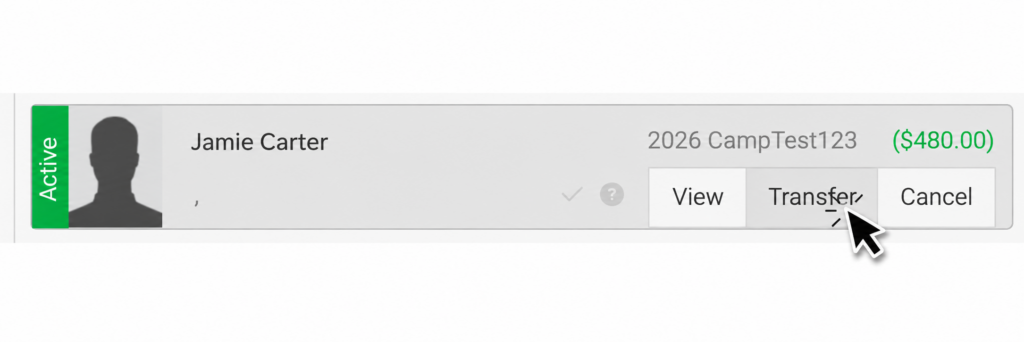
Transfers That Keep Payment Plans – When you select Transfer on a registration in an event’s Registrations tab, its custom payment plan is cancelled on the old registration and recreated on the new one, with amounts recalculated for the new event.
Transportation Price Updates – You can now change a transportation trip’s price even when active reservations exist. Existing reservations keep the old price, and new reservations use the new price. A message shows how many reservations are affected.
Safer Refunds – When you select Issue Refund on a payment, CircuiTree now blocks electronic refunds on payments older than 180 days and points you to other refund methods. Once you choose Check, a Stripe refund can’t be submitted. Refunds on a Stripe ACH payment are blocked until the payment posts to a GL batch.
ACH Guardrail for Merchandise – E-Check and ACH payments are now blocked when itinerary merchandise is in the cart. A message asks the family to pay by card or remove the merchandise.
Automated Cancellation Emails – A new automated email trigger sends when a registration is set to Cancelled. You can find triggers under Settings > Email > Automated Emails > Auto Email Triggers. The email confirms the cancellation and shows the updated balance, including paid and due amounts for payment plans. It does not include refund details.
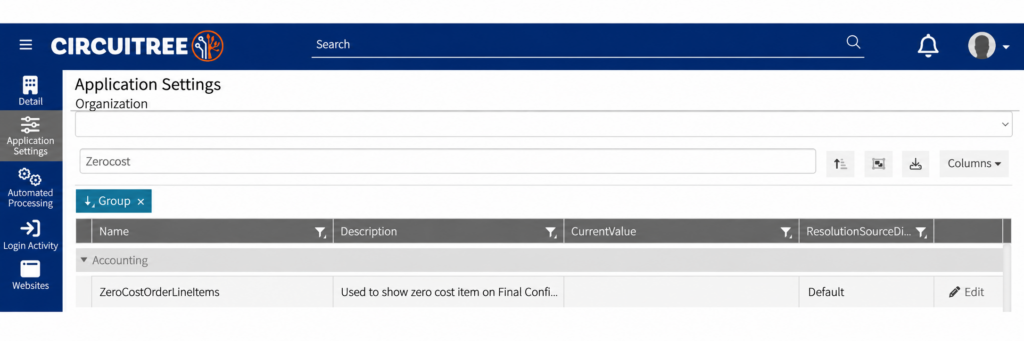
Zero-Cost Items on Confirmation – Resources and add-ons that cost nothing can now show on the final confirmation page. Turn this on with the ZeroCostOrderLineItems setting, found in the Accounting group under Settings > Company > Application Settings.
Faster Group Rosters and Accounting Tab – The Group Roster on the registration site now loads faster for large groups. The line items grid on an itinerary’s Accounting tab also loads faster for large itineraries, and each row’s action buttons appear when you click the row.
More Dosage Options – On the Medical form, the dosage field is now a number field instead of a 1 to 7 dropdown. It accepts amounts up to 30, including half steps such as 0.5.
Alphabetized AR Categories – On an event’s Charges tab, the AR Category dropdown is now in alphabetical order when you add or edit a charge.
Clearer Offset Settings – The Day(s) field is now disabled when Offset is set to None in Event Rollover Options and in the Copy Job Posting window.
Bug Fixes
Payments, Refunds & Checkout
- Fixed a loop that kept parents who were paying a balance across two registrations from completing their payment.
- Fixed an error that rejected some valid card security codes.
- Fixed duplicate Security Code and Expiration fields on Quick Enroll payments, and made Full Amount clickable right away.
- Fixed the same card showing twice on the Online Store order review page.
- Fixed duplicated card details and a missing + Add Payment Method option on Donation payments after a declined card.
- Fixed an error when paying with a verified ACH account during Online Store checkout.
- Fixed Update Itinerary Autopay so you can add a new card or bank account.
- Fixed a Stripe error that said a payment method was already attached when a card was re-entered after an earlier error.
- Fixed an error in Point of Sale when a split payment used cash plus a card already saved to the account.
- Fixed the refund screen and confirmation so they show the amount actually refunded, not the full amount.
- Fixed revenue statements that billed a registration twice after it was cancelled, reactivated, and cancelled again.
- Fixed a Point of Sale cash checkout loop in a second browser tab after a terminal request was cancelled.
- Added a confirmation prompt when Payroll Auto-Draft is turned on for a job posting, and a required acknowledgment for employees who enter bank information on the registration site.
Registration & Waitlist
- Fixed an “overlapping events” error that stopped campers from joining a waitlist when they already had an active registration for an overlapping event.
- Fixed activities not being added on waitlisted events that have an Activity step.
- Fixed charges doubling on internal registrations for past events.
- Fixed internal registrations for “self” type events that could not continue to payment.
- Fixed Save staying stuck on the My Family Add/Edit Individual form after a missing required field was filled in.
- Fixed Assign Housing so a camper moves off the Waiting List when a roommate chain is broken and space is open.
- Fixed group and family transfers that created multiple fixed payment plans.
Event Setup & Transportation
- Fixed lodging dates so they update to match the new start and end dates when you copy an event and change its dates.
- Fixed saving a vehicle, trip, or trip event so it no longer adds a Transportation step to divisions that never had one.
- Fixed the missing outgoing shuttle option when reserving transportation from the back end.
- Fixed an issue that prevented some resources from being selected during registration because of a maximum allocation setting.
- Fixed Group Itineraries so division-specific discounts apply only to registrations in that division.
- Fixed raw HTML showing in the Description column of the Resources grid.
Online Store & Pre-Orders
- Fixed pre-order items in CT6 Admin so they show in the order you set instead of SKU order.
- Fixed Pre-Order > Add Pre-Order so it lists all available merchandise.
Admin, Accounts & Email
- Fixed the Query Editor so saving no longer adds blank lines and tabs, SQL errors show the red Parse SQL message, and queries without parameters no longer show a false parameter error.
- Fixed blank space building up at the top of a SQL statement each time a query is saved.
- Fixed the global search dropdown so it is no longer hidden behind the Registration Search grid.
- Fixed Resend Email on an individual’s Timeline so it sends HTML instead of plain text.
- Fixed address suggestions so they show again on the Address field of a Family Account.
- Fixed an error that kept a CircuiTree user from being created when the generated username already existed for a family member.
- Fixed Create Link so a family’s primary address is linked to each family member and becomes their primary address. Their old primary address is kept, not deleted.
- Fixed compliance application links that opened the last application viewed after login instead of the one in the link.
- Fixed a cookie consent choice that was not carried over from an organization’s main website to its registration site.